


 New
REDGALAXY BOT
Automation software for Red Galaxy, published by ETZEL.
RGBOT-30D
 30 daysDuration
 1 at a timeGame account
- WindowsSystem
 ETZELPublisher
 30 days
 1 at a time
€9.99for 30 daysAll-inclusive price


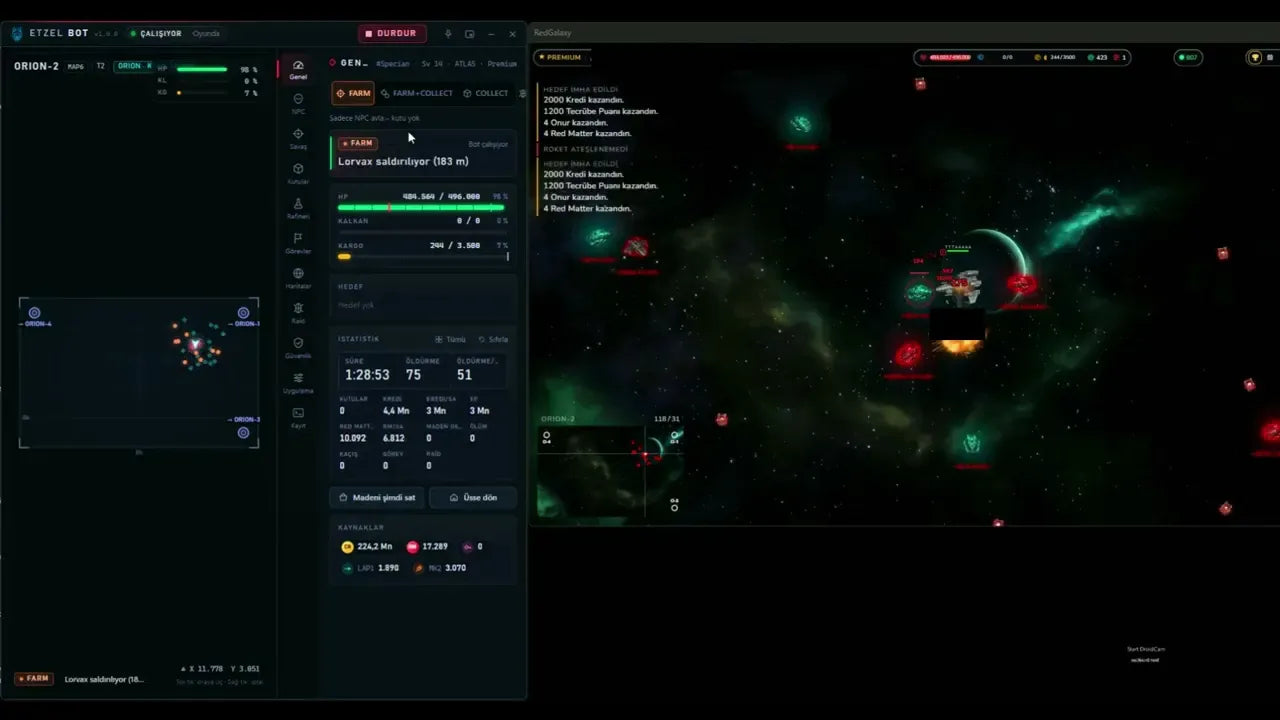
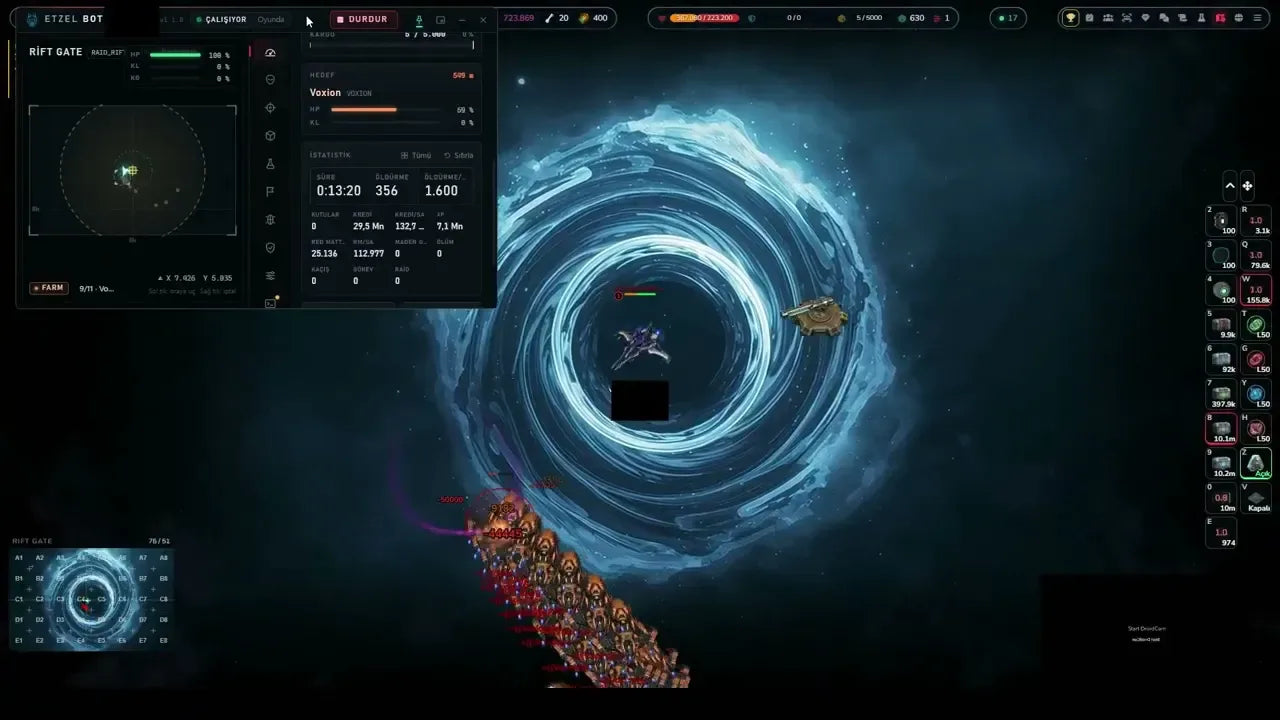
The ETZEL BOT window farming NPCs on NOVA-4
What it automates

 Station



 → NOVA-2
 RAID GATE


-
NPC farming
Finds, locks and attacks NPCs on the maps you choose.
What it does
Finds, locks and attacks the NPC types you switch on, on the map you choose.
How it runs
- Pick a farm map: the bot travels there through portals and starts farming.
- It searches for targets within the search radius and locks the next one by priority.
- It attacks, either circling the target just inside laser range (kite) or closing in to the attack distance.
Settings
- NPC types to attack, map by map, with All on / All off.
- Priority per type: First, Preferred, Normal, Last.
- Attack newly seen NPC types automatically.
- Skip NPCs that are fighting another player.
- Imperon NPCs: normal, shoot first, or only join in.
- Search radius, kite on or off, margin to laser range, attack distance.
- Avoid Sector X or Sector Y when travelling.
Good to know
- The laser range is learned during combat and adjusts itself.
- Farm mode hunts NPCs only; Farm+Collect also collects boxes and does quests.
From the ETZEL BOT interface (version %v). ETZEL may change features in updates.
-

HP thresholds & ship setups
Watches your ship’s HP and switches ship setup with the situation.
What it does
Below the HP you set, the bot pulls back to its base area and only fights again once HP is back up. Each situation (attack, flee, roam, collect, travel) can use its own ship setup.
How it runs
- In combat, if HP drops below the flee threshold, the bot flies back to its base area.
- It fights again only once HP is back to the resume value.
- Without attackers, it can pause to repair below a set HP, then repair up to a target value.
Settings
- Flee below and resume at (HP %). The resume value always stays above the flee value.
- Repair pause: stop below and repair up to (0 % turns the pause off).
- Ship setup for each situation: attack, flee, roam, collect, travel.
- Repair after death: off, free only, or always.
Good to know
- Repairing after death is free only with the starter ship ORIGIN; otherwise it costs 500 RM.
- With repair after death off, the ship stays where it was destroyed.
From the ETZEL BOT interface (version %v). ETZEL may change features in updates.
-

Bonus boxes
Collects the bonus boxes it finds.
What it does
Collects the box types you choose around the ship: NPC cargo, Bonus Boxes and Booty Boxes.
How it runs
- It looks for the selected box types within the box radius.
- During combat it can briefly stop kiting to grab nearby boxes.
- In Collect mode it only collects: it never attacks, not even back, and skips boxes next to aggressive NPCs.
Settings
- Box types: Cargo (NPC loot), Bonus Box, Booty Box.
- Box radius.
- Collect during combat, and the maximum distance in combat.
Good to know
- Booty Boxes need a key.
From the ETZEL BOT interface (version %v). ETZEL may change features in updates.
-
RSAP / LAP-4
Uses the ammo you choose and restocks basic ammo.
What it does
Uses the laser ammo and rockets you choose, and restocks basic ammo with credits.
How it runs
- It fires the laser ammo you select, or an RSAP mix.
- On Auto, it keeps your in-game choice and, when that ammo runs out, switches to the type with the largest stock.
- It fires the selected rocket type whenever it is ready.
- It buys LAP1 and MK1 packs with credits when stock drops below your level.
Settings
- Laser ammo: LAP1 to LAP4, SAP, RSAP mix, or Auto.
- Rocket type (MK1 to MK4) and use rockets.
- Restock LAP1 and MK1: buy below, amount in packs of 1,000.
- Credit reserve and RM reserve the bot never spends.
Good to know
- LAP1 costs 1 CR per shot, MK1 100 CR per rocket.
- LAP4 is not sold in the shop: the bot only uses what you have.
From the ETZEL BOT interface (version %v). ETZEL may change features in updates.
-

Resource selling
Sells collected resources at the station.
What it does
Sells collected ore at the base when the cargo hold fills up, then returns to farming.
How it runs
- When the cargo hold reaches the level you set, the bot flies to the base.
- It sells the ore, then flies back.
Settings
- Sell ore automatically: on or off.
- Sell at cargo fill.
- Sell ore now, by hand.
Good to know
- The bot leaves the farm map for each sale trip.
- The cargo view lists each ore, from iron to tritium, with amount, price and value.
From the ETZEL BOT interface (version %v). ETZEL may change features in updates.
-

Refinery
Refines your resources.
What it does
Refines and enriches ore to boost lasers, rockets, shield and speed.
How it runs
- It keeps the enrichment you choose above its threshold: when it drops below, the bot enriches again.
- It can upgrade ores up to your stock, and refine the ores a quest needs.
Settings
- Refine & enrich: on or off.
- Per category (laser, rocket, shield, speed): enrich below, and amount.
- Tier: Max (plutonium/tritium) or Economy (titanium/uranium).
- Keep laser/rocket shots, keep shield/speed.
- Use antimatter (+40 %) for laser, rocket and shield.
- Send antimatter to the depot, or keep it on board.
Good to know
- Antimatter is valuable: switch it on only if you need it.
From the ETZEL BOT interface (version %v). ETZEL may change features in updates.
-

Missions
Daily, weekly and main missions.
What it does
Accepts daily, weekly and main quests and completes them while farming.
How it runs
- It accepts the quests you allow and completes them while farming.
- It can travel to other maps when a quest needs it.
- For group quests, it can find and join a group, post its own listing, or accept invites.
Settings
- Do quests: on or off.
- Daily quests, weekly quests, main quests by level.
- Quest selection: choose which daily, weekly and group quests to do.
- Daily quests: attack quest NPCs only.
- Group: join automatically, post a listing after 1 minute without a fitting group, accept invites.
Good to know
- Some quests are marked “bot can’t do this” in the list.
- Group main quests are only done when you pick them in the quest selection.
From the ETZEL BOT interface (version %v). ETZEL may change features in updates.
-

Raid Gate
Prepares and opens the Raid Gate.
What it does
Spins for the gates you select, prepares them, jumps in and plays them through.
How it runs
- Raid mode replaces farming while it is on.
- For each selected gate, by priority, it spins for missing parts, buys lives if you allow it, then jumps in.
- In the raid it fights stage by stage and wave by wave, and retreats below the HP you set.
- The panel shows the next step and a log of raid events.
Settings
- Gates and their order.
- Spins: no spin, RME only (1 RME per spin, RM never spent), or RME then RM (100 RM per spin).
- RM floor: spins and lives always leave at least this much RM.
- Buy lives with RM (5,000 RM per life, prepared gates only), and the number of lives to top up before entering.
- Collect boxes and ores in the raid: off, when calm, or after the stage, set per gate.
- Ammo per NPC: auto, laser, rocket, RSAP mix or SAP. It appears after the first raid.
Good to know
- With spins off, the bot only plays gates whose parts are already complete.
- Spins and lives cost RME and RM: the RM floor sets what is never touched.
From the ETZEL BOT interface (version %v). ETZEL may change features in updates.
-

Pyre Warden
Lures the Pyre Warden to a garrison and waits out its barrier.
What it does
Takes on the Pyre Warden of Pyro Core and Pyro 2 without wasting HP or ammo.
How it runs
- It lures the Warden into an asteroid garrison, where the other NPCs leave your ship alone.
- When the Warden raises its protective barrier, the bot stops firing and waits for it to drop.
- Once the Warden explodes, it restores your ship’s HP and shield to 100%.
Good to know
- The Warden starts passive. Once attacked, it fights back: it breaks locks, blocks all damage for 3 seconds, heals from the damage it deals and fires rockets.
- Garrisons only keep NPCs away: PvP stays on there.
From ETZEL’s update notes. ETZEL may change features in updates.
-

Abilities
Uses your abilities when a fight turns against you.
What it does
When the bot gets into trouble fighting NPCs, it uses your ship’s abilities to handle the situation.
How it runs
- It fights NPCs as usual.
- If the fight turns against it, it uses the abilities you have switched on.
Settings
- Each ability on or off, one by one, in the bot settings.
Good to know
- In Red Galaxy, each ability use spends ammo and starts a cooldown.
From ETZEL’s update notes. ETZEL may change features in updates.


Before you buy
Full terms: point 15 of our terms of sale
-
Windows PC required.
A Windows computer or virtual server with the Red Galaxy client for Windows. It doesn’t run on phones, tablets, Macs or in a browser.
-
Sold by Space Syndicate, made by ETZEL.
We sell you the licence and handle your order and key. ETZEL publishes the software and gives technical support on its Discord server. ETZEL’s Discord (new tab)
-
30 days, one game account.
You get 30 days of use from the first activation of the key. Once a week, ETZEL’s support can move the key to another game account. Nothing renews by itself.
How buying works
-
Sign in with Discord
The same sign-in as for accounts. You must be on our Discord server.
-
Pay on the store
Secure payment. The bot is bought on its own, never with an account.
-
Get your key
Right after payment, in My purchases and on your order confirmation page.
Install

-
Windows SmartScreen
The installer isn’t digitally signed, so Windows SmartScreen may warn you before it runs: choose “More info”, then “Run anyway”, only for the file downloaded from our link.
-
Enter your key
Open ETZEL BOT, enter your key, then choose your maps and NPCs.
Questions
- How long does a licence last?
- 30 days of use from the first time you activate the key in the software. If the key runs out sooner, we give you a new one for the missing days. It doesn’t renew by itself: buy a new licence to keep going.
- Where is my key?
- In My purchases on this website, as soon as payment is recorded, and on your order confirmation page. It’s never sent by email or by DM.
- What if the key doesn’t work?
- Tell us in a ticket. We give you a new key within 48 hours.
- What if a game update breaks it?
- ETZEL releases a fix, which the software installs itself. If it stays unusable for more than 48 hours in a row, you get extra days on your licence for the time lost.
- Who do I ask for help?
- Setup and how the bot plays: ETZEL, on its Discord server. Your order or key: Space Syndicate, in a ticket or by email. ETZEL’s Discord (new tab)
- Is it sold everywhere?
- Worldwide, except countries and territories under sanctions or embargo.
Buy REDGALAXY BOT · 30-day licence


RGBOT-30D
€9.99for 30 daysAll-inclusive price

€9.99for 30 daysAll-inclusive price